
Not getting Guildara emails?


If you’re not receiving emails from Guildara, here are a few things to check:
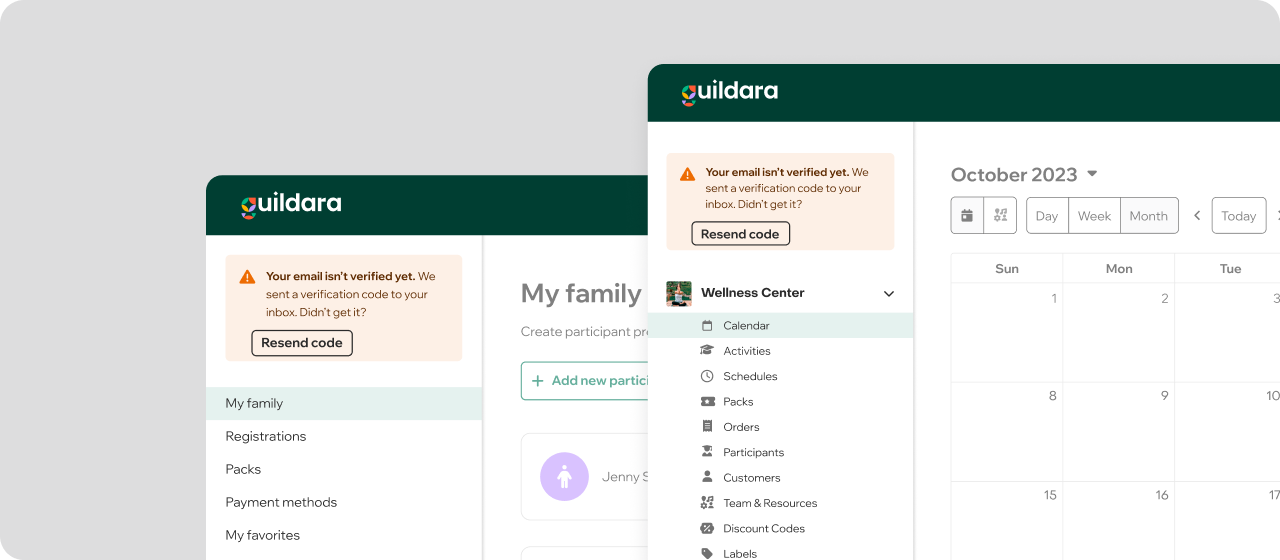
Make sure your email is verified
For security reasons, we don’t send emails with sensitive information to unverified email addresses.
Go to guildara.com. If your email is not verified, you’ll see a warning at the top of the sidebar.
From there, you can resend the verification email.
Check your spam or junk folder
Emails can sometimes end up in spam, especially with providers like Outlook, Hotmail, or Yahoo.
- Look for emails from Guildara in your Spam/Junk folder
- If you find one, open it and click “Not spam” or “Not junk”
- (Recommended) Select “Always trust emails from this sender”
Step-by-step instructions:
- Using Yahoo? check this support article
- Using Outlook/Hotmail? check this support article.
- Using Gmail? check this support article.
Double-check your email address
Make sure there are no typos in your email address. Common mistakes include swapped or missing letters and typos in the domain (e.g. gmil.com, hotmail.co, yahu.com)
If the email address doesn’t exist or is misspelled, messages won’t be delivered.
Follow this guide to update your email address.
Your email might be temporarily blocked
Sometimes emails can’t be delivered due to temporary issues, such as:
- Your inbox is full
- Your email provider rejected the message
- A delivery error occurred (also called a “bounce”)
When this happens, we pause sending emails for a short time to avoid repeated issues. We automatically try again later.
Still not receiving emails?
If you’ve checked all of the above and still aren’t receiving emails, reach out to us and we’ll take a closer look. We’re happy to help!


