
How to apply for scholarships


🌐 Accede a este artículo en español aquí.
STEP 1: Find an activity you love
Go to guildara.com and look for an activity your child would enjoy.
You might already have one in mind, maybe you saw it on a provider’s website, social media, or in your community.
If the activity is part of the scholarship program, you’ll see the “Check for Scholarship” button on the activity page, right below “Sign up.”
If the activity has not been approved for scholarship yet, the button will be greyed out with the reason why it is not available.
STEP 2: Create your account & Add a participant
To apply for a scholarship, you’ll need a Guildara account:
- Click “Sign up” and complete the registration form.
- Make sure to verify your email so you can receive important updates.
Add the participant who will attend the activity:
- Click the participant dropdown and select “Add new participant.”
- Complete the required fields.
- You can also include optional details like allergies or anything the organizer should know.
Now you are all set to apply for scholarships!


STEP 3: Apply for a scholarship
Click “Check for Scholarship” and complete a short application form (called the Household Statement). You’ll be asked about:
- Household size
- Household composition
- Household income
Our system will instantly review your application and show whether it’s approved or denied. If approved, the scholarship will appear as a discount and you’ll see the final price before registering
Keep in mind:
⏳ Funds are reserved for 24 hours, so you have time to decide.
🔒 This information is private and will not be shared with the organization offering the activity.


STEP 4: Complete the registration
Receiving a scholarship does not reserve a spot. To secure your child’s place, click “Sign up” and complete the registration within 24 hours. If the scholarship does not cover the full cost, you’ll need to pay the remaining balance by card.

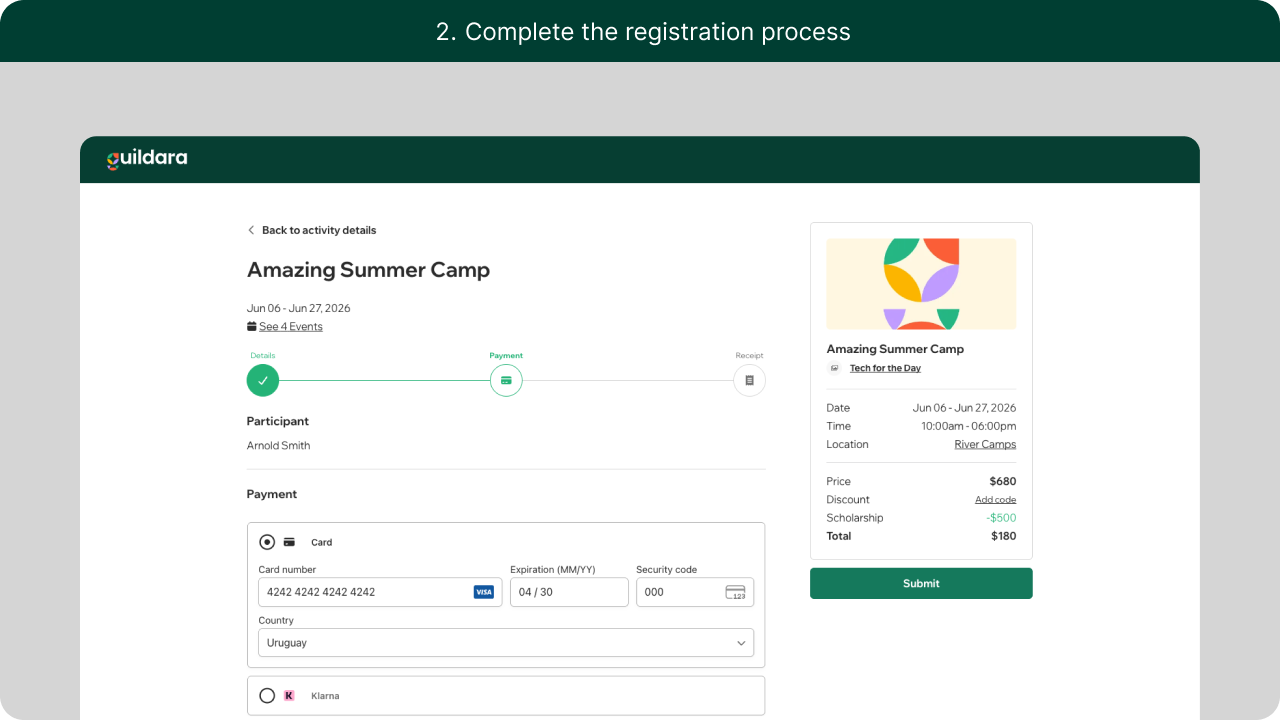

That’s it! Your kid is all set to enjoy their activity 🎉
Frequently asked questions
If I’m approved for a scholarship, am I automatically registered?
No. You have 24 hours to complete your registration by clicking “Sign up.” You’ll also receive an email with a “Finish registration” button.
Am I required to register if I get a scholarship?
No. You’re not obligated to move forward, even if your application is approved.
I applied for one activity, but now I want to register my kid for another
Scholarships are tied to the selected participant and the specific schedule within the activity. If you change either, you’ll need to apply again.
My household information has changed
If your situation has changed, please contact us so we can update your application.
I was approved, but the scholarship is not applied
If your total is already $0, the scholarship won’t be applied. Scholarships only apply when there is a remaining balance to pay.


