
Make a donation to your Scholarship funds


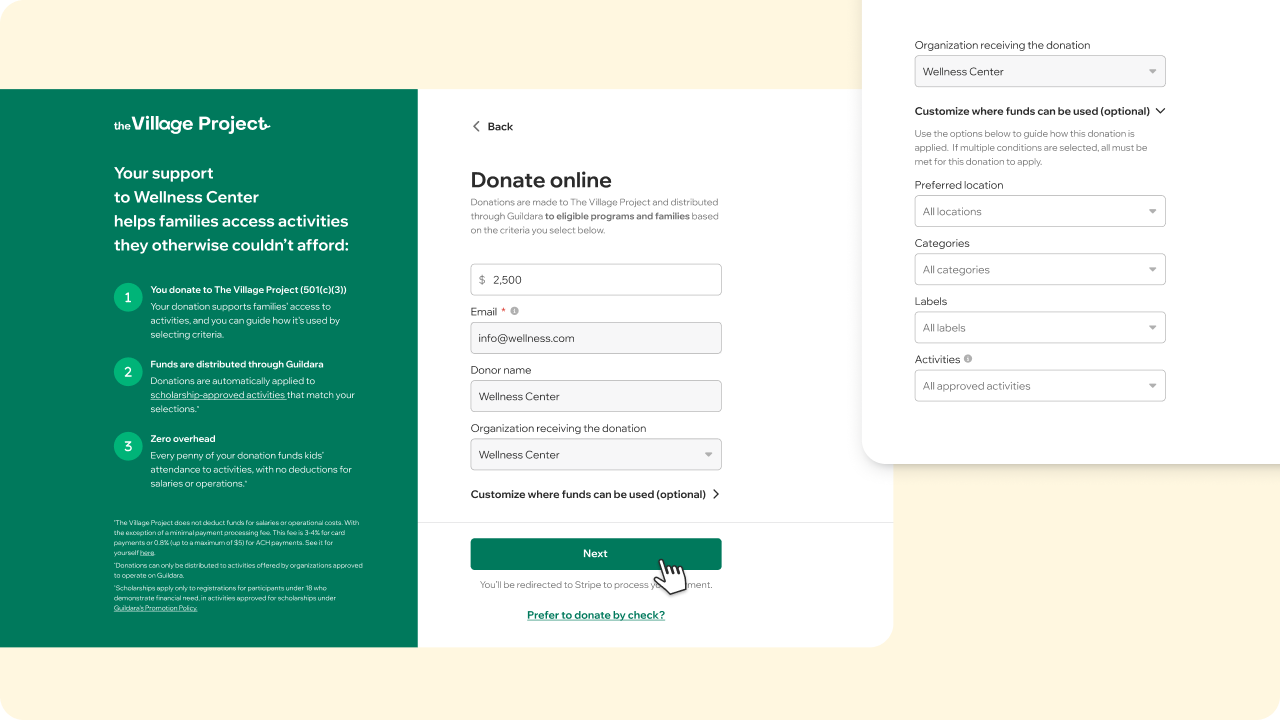
You can add funds to your scholarship fund anytime in just a few clicks. There are two ways to donate:
Donate online (Credit card or US Bank account)
Best if you want a quick, self-serve experience:
- Log in to guildara.com
- Go to the Donations tab
- Click “Make a donation”
- Enter the amount
- Choose how you'd like the donation to be used (optional)
- Complete payment
Your donor information is automatically filled in based on your account details. It can’t be edited here, since it’s used to identify the donation source.
If you wish to make a donation as an individual to another organization on Guildara go to thevillageproject.org.
After you donate online
- You’ll receive a confirmation email
- The donation will appear in your dashboard
Credit card donations usually appear within minutes. ACH donations may take up to 4 business days to appear.
Donate by check
Make checks payable to:
The Village Project
4033 123rd Street
Lake Hallie, WI 54729
United States
If you’d like your donation to support a specific organization, location, category, or activity, download, complete, and print this form and mail it with your check.
If no form is included, your donation will be applied to any scholarship approved activities.
Once received and processed, the donation will appear in your dashboard within 1–2 business days.
Good to know
- Donations are made to The Village Project and distributed through Guildara to eligible programs and families based on the criteria you select below.
- Scholarships apply only to registrations for participants under 18 who demonstrate financial need, in activities approved for scholarships under Guildara's Promotion Policy.
- Donations can only be distributed to activities offered by organizations approved to operate on Guildara.


